Raising the accessibility bar
Credit card servicing had 7 launch blocking defects. They were all accessibility problems, and finding them that late meant an annotation, a fix, and another review for each one. The same defects kept coming back after that, in implementation and in mock ups across the team. Amazon has a set of critical customer requirements for accessibility, but reading one and knowing what it asked of a particular screen were two different things, and few of us had been shown how to annotate a file so that an engineer could build from it.
A design can meet every requirement and still ship inaccessible, if the requirements never reach the spec or the build does not follow the annotations. So I wrote for all three groups. Designers learn accessibility and how to annotate for it, covering reading order, heading levels, roles, names, states, and what has to be on a file before a hand off. Product and engineering follow a standard operating procedure that sets out which requirement each of them owns, what their part of it is, and where it sits in the way they already work. Nothing has blocked a launch since.
7 Accessibility launch blockers cleared in credit card servicing
0 Accessibility defects have blocked a launch since
Design Insight (AI tool)
Nobody looked hard at a proposal until a formal review or a usability test, and both of those come late. The accessibility review was mine to run, so designs reached me finished, and getting one done and approved took about 3.5 weeks.
So I built Design Insight, to let a designer find the faults in their own proposal before any of that. It reads a design against the same documentation and returns what is missing, where the design breaks usability heuristics, and a walkthrough of the main tasks as a few personas. A designer can run it as often as they like and fix what comes back, so the version that reaches a review or a test is not the first one.
Accessibility is the part I can put a number on, because I was the one approving it. An approval now takes about a week, down from 3.5.
A team with its own research can hand that over and the results are grounded in it. Without it, the results come from the model's training data. That is a place to start a conversation, not a substitute for testing with people.
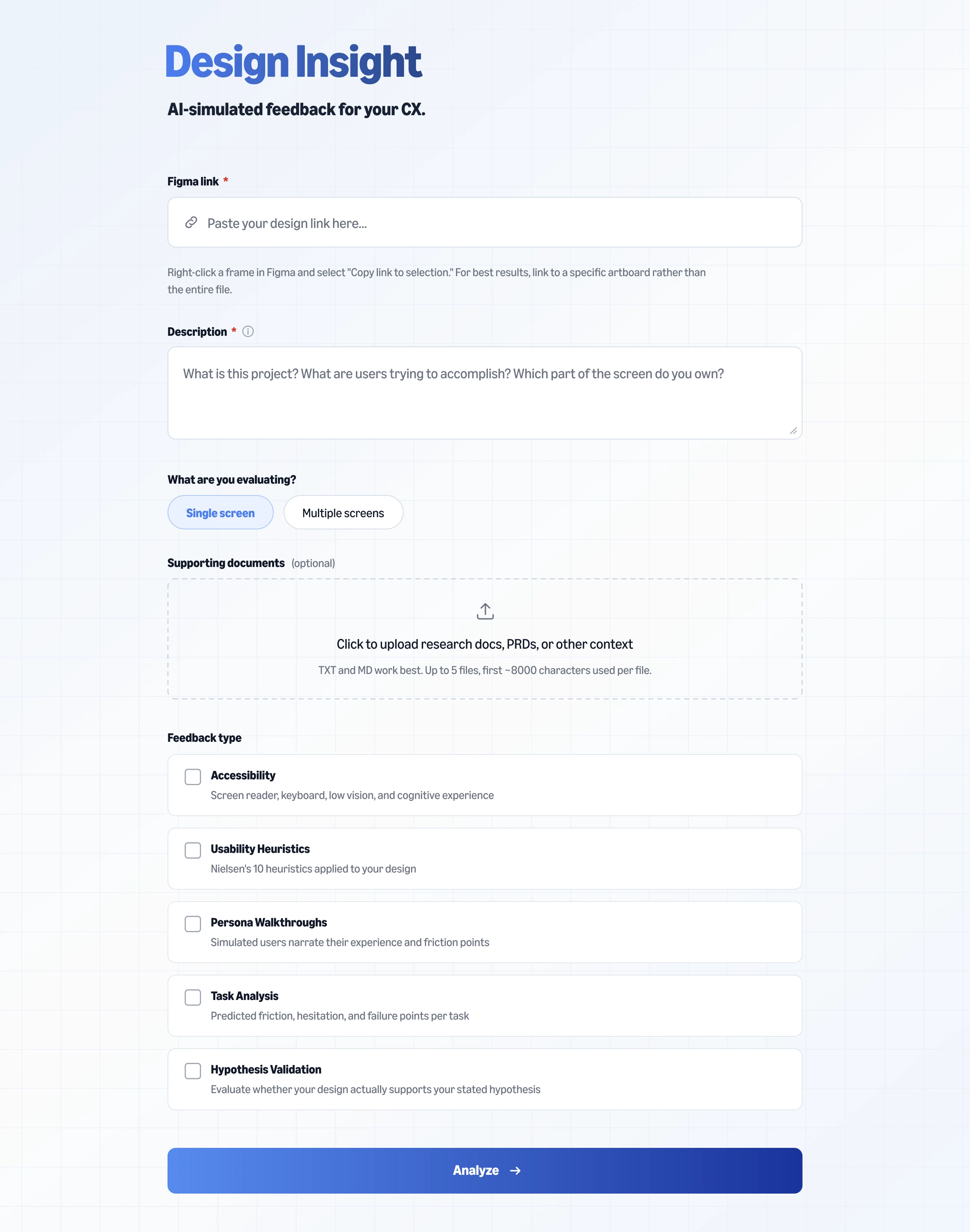
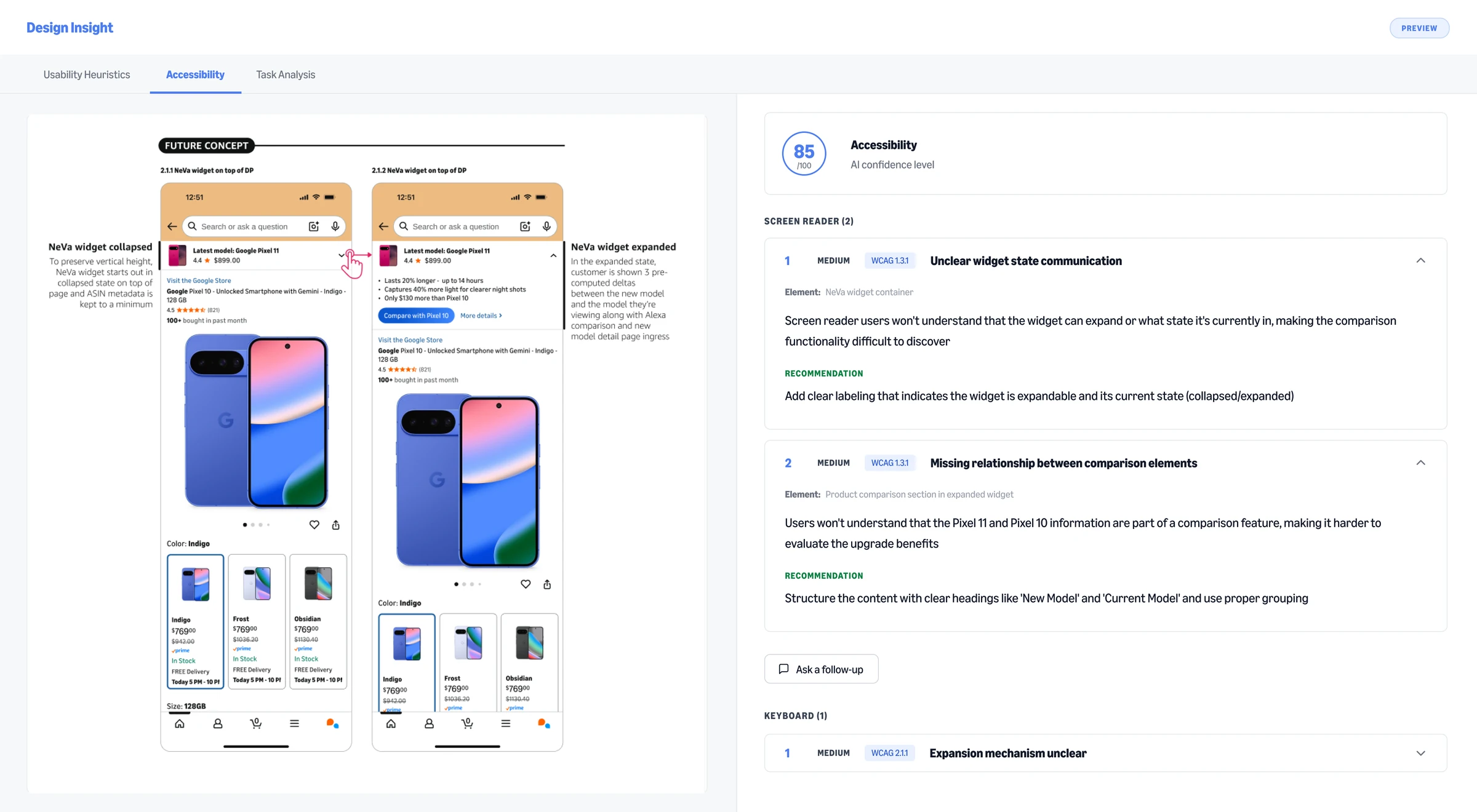
A custom prototyping agent
The experiences my team designs sit inside pages other teams own, the Amazon home page and search results among them. Rebuilding one of those pages as a prototype, accurately enough to show someone, took two and a half to three hours every time, before anyone could look at what was new.
The design system covers the components every team shares. The parts particular to a single page belong to the team that owns it, and so do the names for them, down to what each block on the page is called. None of that is in the design system, so rebuilding one of those pages meant reading the live page and copying it by eye.
I built an agent that already knows those pages and that vocabulary instead. Ask it for an ingress point for your feature in one of the card slots on the home page, in that page team's own words for it, and it knows what you mean, where it goes, and how to build the page around it as it stands in production, from the first prompt. It does the same for search results, a detail page, a cart or a checkout. Starting needs no Figma link and no design of your own, only a sentence.
What took two and a half to three hours takes minutes now. Those hours were going into a page that already existed, so a designer gets them back for the experience they own. And someone with no designer to ask, a product manager or an engineer, can put a real idea in front of their team the same afternoon they have it.
An AI Builder Playbook
I wrote a manual for UX designers who are designing and shipping production experiences with AI and an engineering partner. Most of it comes from my own mistakes on a live retail feature, so it is meant to be worked through in order rather than read once. It has:
- Five phases, in sequence. Each one states what has to be true before it starts, the steps, what comes out of it, what has to be true before it ends, and how to tell whether it is working.
- An ownership split. A designer leads the first two phases, shares the next two with an engineering partner, and owns the last one.
- Engineering words, defined where they first appear. A designer does not need to know any of them going in. Picking them up along the way is part of the method.
My group is adopting it now.